Point of sale
A counter that keeps moving
Ring up a sale in seconds, take payment however the customer wants to pay, and let stock update itself. No terminal to lease, no connection to depend on.
- Runs in any browser
- Keeps selling offline
- No proprietary hardware
The difference
Checkout stops being the bottleneck
Most counters lose time twice: once at the till, and again at close when the numbers have to be pieced back together.
A typical counter
On Klynto
Stock is counted by hand after close, so the shelf and the sheet disagree by morning.
Every sale deducts from inventory as it rings, so the count is already right at close.
The connection drops and the queue stops — sales get written on paper and typed in later.
Checkout keeps working offline and syncs on its own once the connection returns.
Split payments and custom tenders get recorded as notes, then reconciled from memory.
Cash, card, split, and custom payment types are first-class at the till.
Cash variance surfaces days later, with no way to tie it back to a shift.
Shifts open and close with drawer counts, so variance is attributed the same day.
How it holds up
Built for the awkward moments
Selling when the internet is not
Outages are a scheduling problem, not a sales problem. The till keeps taking orders and payments through a drop, holds the queue locally, and reconciles automatically once it reconnects — with no re-keying and no duplicate sales.
- Checkout, discounts, and payment all work offline
- Queued sales sync automatically on reconnect
- No manual re-entry once you are back online
Whatever is already on the counter
The till is a web app, so the tablet, laptop, or phone you own today is the terminal. Add a second device for a busy hour and remove it after — there is no per-terminal contract to renegotiate.
- Tablet, desktop, or mobile browser
- Add or drop a device without a hardware order
- Receipts print or email with your own branding
A close that reconciles itself
Open a shift with a starting count and close it with a final one. Klynto reports the day's sales, cash movements, and variance against what the drawer should hold — so a discrepancy is caught while the person who worked the shift is still there.
- Per-shift cash drawer counts
- Variance reported against expected cash
- Day's takings summarised without a spreadsheet
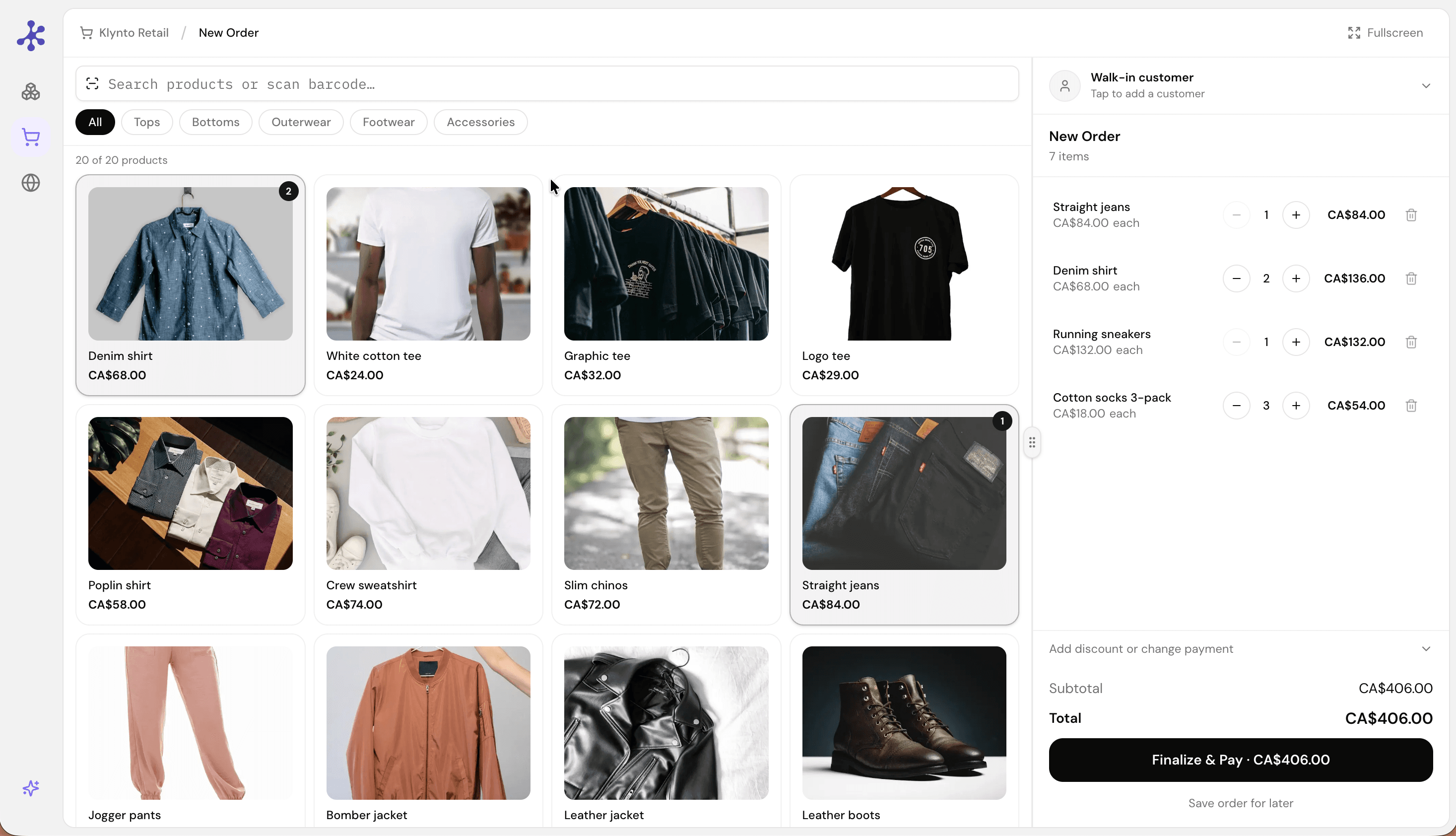
The till mid-sale: items on the ticket with their quantities, the running total, and payment one tap away.
Requirements
Runs on what you already own
There is no certified hardware list, because there is no certified hardware. If it runs a modern browser, it runs the till.
Devices
- Terminal
- Any modern browser
- Form factors
- Tablet, desktop, mobile
- Proprietary hardware
- Not required
- Terminals per site
- Add or remove anytime
Payments
- Cash
- Supported
- Card
- Supported
- Split payment
- Supported
- Custom tender types
- Configurable
Receipts
- Delivery
- Print or email
- Branding
- Your logo and policy
- Catalog source
- Your Klynto products
Connectivity
- Offline checkout
- Supported
- Reconnect behaviour
- Syncs automatically
- Inventory sync
- On every sale
At the till
The rest of the counter
Fast checkout
Add items, apply a discount, and take payment without leaving the keypad.
Flexible payments
Cash, card, split, and custom tender types are all first-class.
Inventory sync
Each sale deducts stock immediately — no nightly reconciliation.
Offline mode
Keep selling through an outage; the queue syncs when you reconnect.
Branded receipts
Print or email receipts carrying your logo and return policy.
Shift & cash tracking
Open and close shifts with drawer counts and variance reports.
Discounts
Apply line or order level discounts at the moment of sale.
Shared catalog
The till reads the same products the rest of Klynto uses.
Before you switch
The questions that actually decide it
Put it on the counter today
Open Klynto on the tablet you already have and ring up a sale. Nothing to install, nothing to lease.