Inventory
Stock that is right without counting
Every sale, return, and delivery moves the number on its own, so what the screen says and what the shelf holds stop being two different facts.
- Updates on every transaction
- Alerts before zero
Every other module is reading this number
The till deducts from it, the storefront sells against it, purchase orders replenish it, and the reports explain it. Getting stock right is not one feature — it is the thing the rest of the workspace depends on.
What it does
Three jobs, none of them manual
Levels that move themselves
A sale at the counter, a return, an online order, and a received delivery all touch the same figure as they happen. There is no nightly reconciliation step because nothing was ever allowed to drift.
- Sales and returns deduct and restore immediately
- Received purchases raise levels on logging
- One figure shared by every module
A warning with time left in it
A reorder point is a per-product judgement, not a global setting. Set the level where reordering still works for that item's lead time, and the alert arrives while you can still act on it rather than as a postmortem.
- Reorder points defined per product
- Alerts fire at your level, not a default
- Expiry flagged before it becomes waste
One view over several places
Branches, warehouses, and storage rooms each hold their own stock while remaining comparable in one screen. A sale in one shop moves that shop's number, and you can move stock to where it is actually needed.
- Per-location levels, one comparison view
- Transfers between locations
- Fast and slow movers surfaced per site
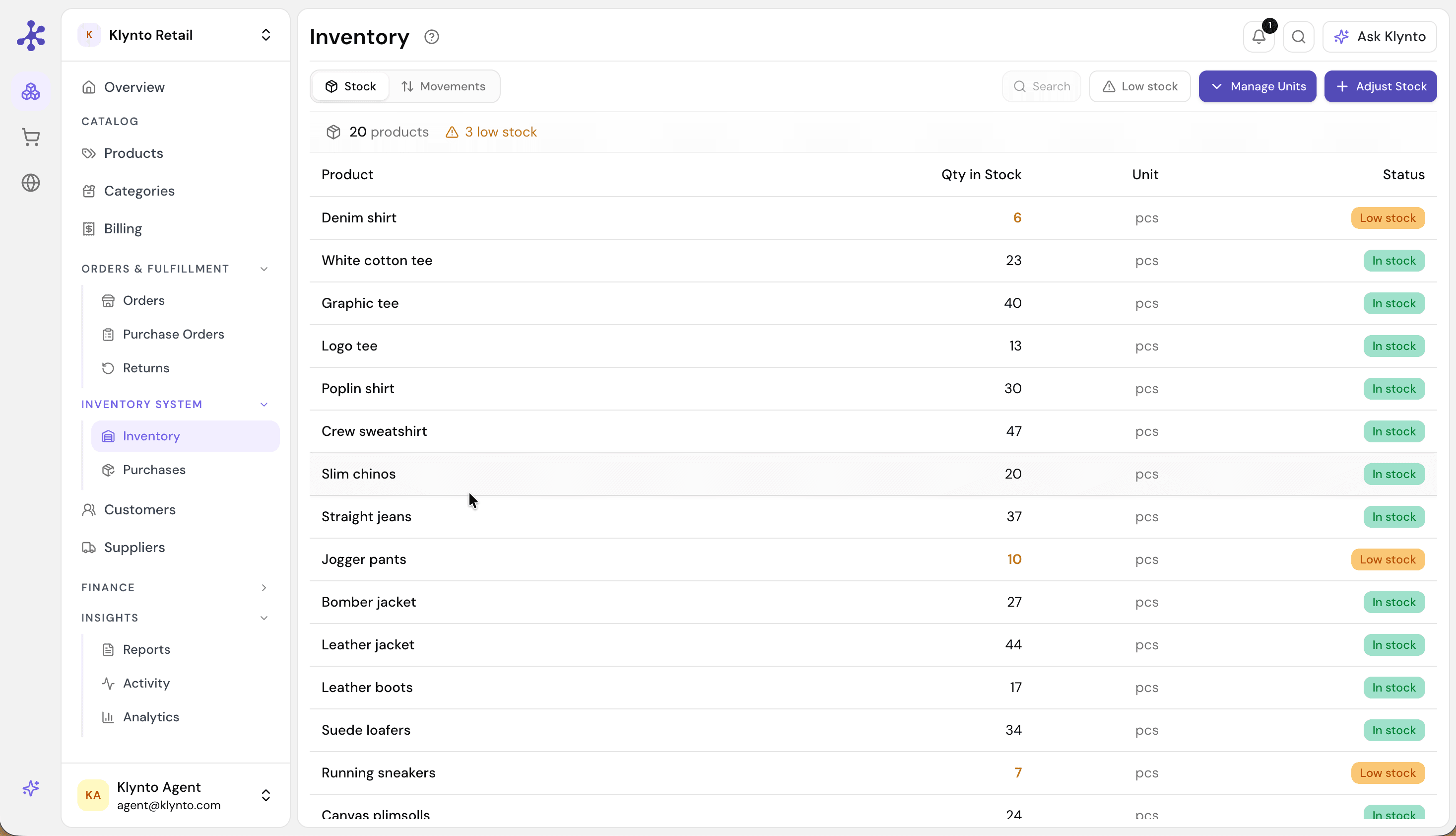
Live stock levels across the catalogue, with every product that has fallen under its reorder point flagged in the same list.
Getting set up
From catalog to first alert
The setup is short because most of it is deciding numbers, not configuring software.
Bring in the catalog
Import products as a CSV or build the list in Klynto. Whatever you add is immediately available to the till, the storefront, and the reports.
Set reorder points
Give each product the level where you would want to be told. This is the one judgement the system cannot make for you.
Log what you receive
Record purchases as stock arrives and levels rise on their own — no separate stock-in spreadsheet to keep alongside.
Reorder from the alert
When a product crosses its point, raise the purchase order from that same screen and send it, so noticing and acting are one step.
Included
What the module carries
Live stock levels
Every sale, return, and purchase updates instantly.
Low-stock alerts
A warning at the level you chose per product.
Purchase orders
Raised and sent from the inventory screen.
Multi-location
Branches and warehouses in one view.
Expiry tracking
Items flagged before they become waste.
Usage analytics
Fast and slow movers, to reorder smarter.
Practical questions
What people check first
Import a catalog and set one reorder point
That is enough to see the whole loop — a sale moving the number, and an alert arriving before zero.